

CAD vs BIM for Measured Surveys: Which Output Do You Actually Need?
June 23, 2026 10:27 amYou’ve probably been in that meeting. Someone says “we need BIM” with great confidence, everyone nods, and then… nobody quite unpacks what that actually means for the survey brief. It happens all the time. And on the flip side, plenty of clients stick with CAD simply out of habit, even when a richer dataset would save them a significant headache down the line.
Getting this decision wrong is more costly than most people realise. Over-specify and you’re paying for data you’ll never use. Under-specify and you’re dealing with on-site clashes that nobody budgeted for. Neither is a great place to be.
So, let’s talk it through properly. Here’s what you actually need to know before commissioning your next measured building survey.
The Fundamental Difference: Geometry vs Information
At its core, the choice comes down to one question: do you need a drawing, or do you need a database?
What is CAD in the Context of a Survey?
CAD (Computer-Aided Design) is, in essence, a very precise electronic drawing. Lines, arcs, layers, and dimensions, all arranged to represent the physical reality of a building. Think of it as the digital evolution of the traditional draughtsman’s work. Your 2D CAD drawings will show you exactly where things are, with impressive accuracy, but they won’t tell you much beyond that.
And honestly? That’s fine for a huge number of projects. A clean set of 2D floor plans, elevations, and sections gives architects, planners, and contractors a reliable record that’s universally readable, requires no specialist software, and gets the job done without any fuss.
What is BIM in the Context of a Survey?
BIM (Building Information Modelling) is a different thing altogether. Rather than lines on a drawing, you’re getting an intelligent, data-rich model where every element is a real building object. A wall isn’t just a line; it knows its material, its thermal properties, its fire rating. A window carries its dimensions, its U-value, and potentially its manufacturer. It’s the difference between a photograph and a full biography.
The industry standard for this is Revit, and a well-constructed 3D Revit model can serve as a single source of truth across the entire life of a building, from initial design right through to long-term facilities management.
The BIM vs CAD question, then, isn’t really about software preferences. It’s about what level of information your project genuinely needs, and whether that investment makes sense for your specific scope.
The Measured Survey Workflow: From Laser Scan to Deliverable
Here’s something that surprises a lot of clients: both CAD and BIM outputs almost always start from exactly the same place.
The Starting Point: The Point Cloud
Before any drawing or modelling begins, our team captures the building using a 3D laser scanner. The result is a point cloud, millions upon millions of precise measurements stitched together into a detailed 3D record of the existing structure. If you’ve not come across this before, it’s well worth reading up on what a point cloud is before diving into the rest of this.
The point cloud is the raw material. What we do with it next is where CAD and BIM go their separate ways.
Option A: Scan to CAD
The point cloud becomes a reference from which we produce your 2D drawings: floor plans, elevations, sections, and roof plans. These are clean, accurate, and precisely what most planning applications call for. Scan to CAD is quicker to deliver, straightforward to share, and works natively with most architectural drafting workflows. For plenty of projects, it’s exactly the right tool.
Option B: Scan to BIM
Here, the point cloud is used to build a fully parametric 3D model in Revit or similar software. Every element, including walls, columns, beams, doors, windows, and MEP (mechanical, electrical, and plumbing) systems, is modelled as an intelligent object with embedded data. This is where our Scan to BIM expertise comes in, and it’s a considerably more powerful output, though it does come with a higher upfront investment in modelling time.
Decision Matrix: CAD or BIM?
| Cost | Lower | Higher upfront |
| Turnaround Time | Faster | Longer (more modelling) |
| 3D Visualisation | Limited | Full 3D parametric model |
| Data Depth | Geometry only | Materials, properties, costs |
| Clash Detection | Not possible | Yes |
| Long-Term Value | Drawing record | Living asset database |
| ISO 19650 Compliance | Not applicable | Fully supported |
When to Choose CAD
CAD is often the right answer, and there’s nothing wrong with that. Smaller renovation projects, planning applications, heritage recording, and budget-sensitive commissions are all brilliantly served by a high-quality set of 2D drawings. If your team works primarily in 2D and your project doesn’t require multi-discipline coordination, there’s no reason to carry the overhead of a full BIM model.
Straightforward isn’t a compromise. Sometimes it’s just the sensible, efficient choice.
When to Choose BIM
Complex refurbishments, large commercial sites, and projects where multiple consultants need to coordinate simultaneously are where BIM really proves its worth. If you’re dealing with MEP coordination, significant structural changes, or anything where an undetected clash could cause costly on-site disruption, the upfront investment in BIM pays for itself.
It’s also worth knowing that ISO 19650, the UK framework for information management in construction, is now increasingly a contractual requirement on government-procured projects and larger private commissions. If your scheme falls into that category, BIM isn’t really optional.
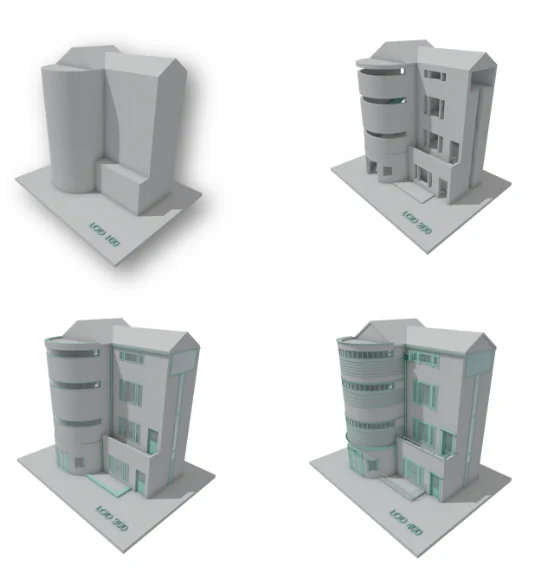
Understanding LOD (Level of Detail) in BIM Surveys
This is where things get a bit more nuanced, and where a lot of briefs go wrong. BIM isn’t a single, fixed output. When you commission a BIM survey, you need to specify the Level of Detail (LOD) required, and this has a direct impact on both the cost and the usefulness of what you receive.
Think of LOD as a scale:
- LOD 100, Conceptual. Basic massing and no precise geometry. Useful for early feasibility work.
- LOD 200, Approximate dimensions and locations. Good for initial design coordination.
- LOD 300, Accurate geometry, ready for construction documents and clash detection.
- LOD 400, Fabrication-level detail, covering materials, assembly, and installation information.
For most measured building surveys, LOD 200 or LOD 300 is the sweet spot. You probably don’t need LOD 400 unless you’re heading into fabrication or highly specialist fit-out, and commissioning it unnecessarily is a reliable way to inflate your budget without adding real value.
Alongside LOD, you’ll also encounter LOI (Level of Information), which covers the non-geometric data embedded in the model: material specifications, cost codes, maintenance schedules, and so on. Together, LOD and LOI define how much your model actually knows about your building, and getting the right combination specified from the outset is something we help our clients work through every time.
The Cost Question: Is BIM More Expensive?
Yes, upfront. There’s no point dressing that up. A Scan to BIM survey takes longer to produce than a Scan to CAD output, because modelling intelligent objects from a point cloud is skilled, detailed work.
But consider what you’re getting in return. A well-built BIM model reduces the risk of on-site clashes, which can cost tens of thousands of pounds to resolve once construction is underway. It enables your structural engineer, MEP consultant, and architect to work from a single coordinated model simultaneously, cutting down on the kind of coordination errors that derail programmes and test relationships. And once the project is complete, that model becomes a live asset record for whoever manages the building going forward, with real value for future maintenance, refurbishment, or repurposing.
BIM costs more now because it’s designed to save you more later. Whether that trade-off is right for your project is the conversation worth having before you write the brief.
Making the Right Choice for Your Site
CAD is the trusted workhorse of the built environment. It’s fast, accessible, and perfectly suited to a wide range of projects. BIM is increasingly the backbone of serious asset management, bringing intelligence and coordination to complex schemes that need more than just accurate drawings.
The real risk isn’t choosing one over the other. It’s choosing without properly thinking it through. Get in touch with the Castle Surveys team for a no-pressure technical consultation, and we’ll help you arrive at the right output for your project from the start.
Castle Surveys provides professional measured building survey services across the UK. For expert advice on the right survey output for your project, visit our measured building survey services page or explore our Scan to BIM expertise.
Frequently Asked Questions
Can you convert my old CAD files to BIM?
Yes, this process is known as CAD to BIM conversion and it’s entirely achievable. The quality of the resulting model depends heavily on the accuracy and completeness of your original drawings, so it’s always worth a conversation about the source material before committing. In some cases, a fresh laser scan combined with new BIM modelling gives a more reliable result than working from legacy CAD files.
Do I need special software to view a BIM model?
Not necessarily. While BIM models are typically produced in Revit, they can be exported to IFC format, which is viewable in a range of free platforms. For clients who don’t work with Revit day-to-day, we’ll always advise on the most practical way to access and use your deliverables without needing to invest in new software.
What is the typical turnaround time for a Scan to BIM survey?
It varies depending on the size and complexity of the building and the LOD specified. As a general guide, Scan to CAD is quicker to deliver than Scan to BIM, given the additional modelling involved. We’ll give you a realistic programme at the outset so you can plan around it with confidence.
Comments are closed here.